
Room Database

📌 Room Persistence Library is a higher-level abstraction over SQLite that simplifies local database operations in Android apps. It wraps SQLite so we can have easy communication and operations.
Table of Contents
📖 Background — What is SQLite in Android?
- SQLite is the most commonly used local database in Android development
- It is a lightweight, relational DBMS embedded directly into Android OS
- Databases are stored as files on the device and accessed using SQL queries
- Developers can use either SQLiteOpenHelper or the Room Persistence Library
⚖️ Why Room over SQLiteOpenHelper?
| SQLiteOpenHelper ❌ | Room Library ✅ | |
|---|---|---|
| Boilerplate | Tons of manual code | Eliminated via annotations |
| Data retrieval | Manual Cursor handling | Clean method calls |
| Error detection | Runtime errors | Compile-time verification |
| Ease of use | Verbose and complex | Simple and clean |
| Memory leaks | Easy to forget cursor.close() | Handled automatically |
🆚 Code Comparison — SQLiteOpenHelper vs Room
❌ SQLiteOpenHelper — Insert (verbose boilerplate)
public void insert(String name, String description, SQLiteDatabase database) {
    ContentValues contentValue = new ContentValues();
    contentValue.put("NAME", name);
    contentValue.put("DESCRIPTION", description);
    database.insert("PRODUCTS", null, contentValue);
}
❌ SQLiteOpenHelper — Retrieve (painful cursor loop)
Cursor c = database.rawQuery("SELECT * FROM PRODUCTS");

if (c != null) {
    if (c.moveToFirst()) {
        do {
            String name        = c.getString(0);
            String description = c.getInt(1);
            results.add(new Product(name, description));
        } while (c.moveToNext());
    }
}
c.close(); // ⚠️ easy to forget — causes memory leaks!


👉 New here? Read the full guide on https://rushira.in/to-do-note-app-in-android-sqlitedatabase/#sq-lite-database  for deeper understanding.
✅ Room — Same operations, ZERO boilerplate
@Dao
interface ProductDao {

    // replaces all that ContentValues + insert() boilerplate
    @Insert
    fun insert(product: Product)

    // replaces the entire Cursor loop above
    @Query("SELECT * FROM products")
    fun getAll(): List<Product>

    @Delete
    fun delete(product: Product)
}
💡 Key insight: Room eliminates all manual SQL and cursor code. You just define the method and Room generates the implementation at compile time.
✅ 3 Key Benefits of Room
1. 🔍 Compile-time Verification of SQL Queries
- Checks SQL for syntax errors and type mismatches at compile time — not at runtime
- Room processes
@Entityand@Daoannotations during compilation - Generates database handling code automatically
- Reduces runtime crashes and improves code quality
2. 🏷️ Convenience Annotations
- Minimizes repetitive and error-prone boilerplate code
- Use
@Insert,@Delete,@Query,@Updateinstead of writing SQL manually
3. 🔄 Streamlined Database Migration Paths
- Simplifies handling schema changes across different app versions
- Room provides built-in features to manage DB migrations efficiently
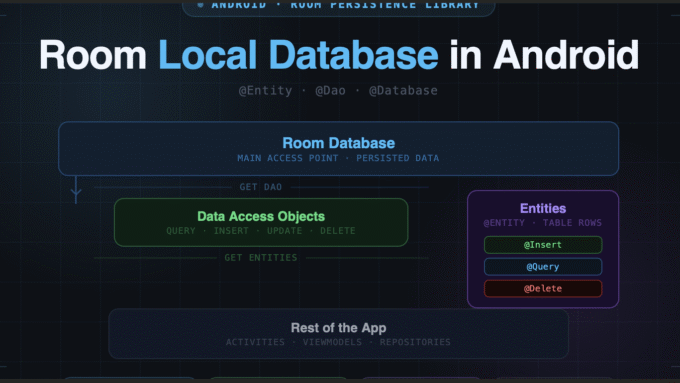
🏗️ Architecture — 3 Primary Components
┌─────────────────────────────────────────────┐
│               Room Database                 │
│                                             │
│    ┌──────────────────────────┐             │
│    │   Data Access Objects    │   Entities  │
│    │         (DAO)            │  ┌────────┐ │
│    │                          │  │ Table  │ │
│    │  • getAll()              │◄─┤ Rows   │ │
│    │  • insert()              │  │ Fields │ │
│    │  • delete()              │  └────────┘ │
│    └──────────────────────────┘             │
│                   ▲                         │
│               Get DAO                       │
└───────────────────┼─────────────────────────┘
                    │
          ┌─────────▼─────────┐
          │   Rest of App     │
          │  (Activities,     │
          │   ViewModels...)  │
          └───────────────────┘
Component 1 — Database Class
- Main access point to persisted data
- Holds the database and provides DAO instances to the app
- Annotated with
@Database
Component 2 — Entity
- Data class annotated with
@Entity - Represents a table in the database
- Each instance = one row in the table
Component 3 — DAO (Data Access Object)
- Interface annotated with
@Dao - Provides methods to query, insert, update, and delete data
- The app uses DAO methods to talk to the database
🔗 How the Components Relate
App
 │
 ▼  "give me the DAO"
Database Class ──────────────► DAO
                                │
                                │  "get / persist entities"
                                ▼
                            Entities (rows)
                                │
                                │  "get / set field values"
                                ▼
                           Your Object (data class)
💻 Implementation — Step by Step
Step 1 — Define an Entity
@Entity(tableName = "contact")
data class Contact(
    @PrimaryKey(autoGenerate = true)
    val id: Long,        // ← auto-increments, you never set this manually
    val name: String,
    val mobile: String
)
How this maps to a database table:
| ID | NAME | PHONE |
|---|---|---|
| 1 | John | 99999 |
| 2 | Sean | 22222 |
| 3 | Jack | 77777 |
⚠️ Note:
autoGenerate = truemeans Room assigns the ID automatically — you never set it manually when inserting.
Another example with custom column names:
@Entity
data class User(
    @PrimaryKey val uid: Int,
    @ColumnInfo(name = "first_name") val firstName: String?,
    @ColumnInfo(name = "last_name") val lastName: String?
)
Step 2 — Define a DAO
@Dao
interface UserDao {

    @Query("SELECT * FROM user")
    fun getAll(): List<User>

    @Query("SELECT * FROM user WHERE uid IN (:userIds)")
    fun loadAllByIds(userIds: IntArray): List<User>

    @Query("SELECT * FROM user WHERE first_name LIKE :first AND last_name LIKE :last LIMIT 1")
    fun findByName(first: String, last: String): User

    @Insert
    fun insertAll(vararg users: User)

    @Delete
    fun delete(user: User)
}
Step 3 — Define the Database Class
The database class must satisfy 3 conditions:
- Annotated with
@Database(includes anentitiesarray) - Must be an abstract class that extends
RoomDatabase - Must define an abstract method for each DAO (zero arguments, returns DAO instance)
@Database(entities = [User::class], version = 1)
abstract class AppDatabase : RoomDatabase() {
    abstract fun userDao(): UserDao
}
Step 4 — Usage (Build and Use the DB)
// Build the database instance (do this once, use singleton)
val db = Room.databaseBuilder(
    applicationContext,
    AppDatabase::class.java,
    "database-name"
).build()

// Get DAO and interact with the database
val userDao = db.userDao()
val users: List<User> = userDao.getAll()
⚠️ Important: Always create the database as a singleton — creating multiple instances is expensive and can cause issues.
📦 Setup — Add Dependencies
Add to your app’s build.gradle file:
def room_version = "2.6.1"

implementation "androidx.room:room-runtime:$room_version"
kapt "androidx.room:room-compiler:$room_version"

// Optional - Kotlin Coroutines support
implementation "androidx.room:room-ktx:$room_version"
🗂️ Quick Reference — Annotations Cheatsheet
| Annotation | Used On | Purpose |
|---|---|---|
@Entity | Data class | Marks class as a DB table |
@PrimaryKey | Field | Marks the primary key |
@ColumnInfo | Field | Maps field to a custom column name |
@Ignore | Field | Room ignores this field |
@Dao | Interface | Marks interface as a DAO |
@Query | Method | Custom SQL query |
@Insert | Method | Insert row(s) |
@Delete | Method | Delete row(s) |
@Update | Method | Update row(s) |
@Database | Abstract class | Marks as Room Database |
📱 Common Use Cases for Local Databases in Android
- 🔧 Storing user preferences and app settings
- 📦 Caching data from remote servers for faster access
- ✍️ Managing user-generated content locally
- 📴 Implementing offline functionality in apps
📚 References
Room Persistence Library
https://developer.android.com/training/data-storage/room