

Building a Production-Grade Anime Browser with Room DB, Clean Architecture & Jetpack Compose

A deep dive into offline-first Android development — from SQLite basics to use cases, @Relation, and cinematic dark UI
Table of Contents
Why I Built This
Every Android tutorial teaches you how to use Room. Few show you how to use it properly — with a clean architecture, a real offline-first strategy, proper cache invalidation, and a UI that actually communicates what’s happening under the hood.
This article walks through building a complete Anime Browser app that:
- Fetches data from the Jikan API (free MyAnimeList wrapper, no key needed)
- Caches everything in Room DB with a 30-minute TTL
- Works fully offline with stale-data fallback
- Uses Clean Architecture — data, domain, and presentation layers with zero cross-contamination
- Shows the user exactly where their data came from and when
Overview
The Problem with “Learning Room” Projects
Most Room tutorials look like this:
// The tutorial way
val db = Room.databaseBuilder(context, AppDatabase::class.java, "db").build()
val users = db.userDao().getAll()
That’s fine for understanding the API. It’s terrible for production. The ViewModel imports the DAO directly. There’s no caching strategy. The UI has no idea if it’s showing live or stale data. When you go offline, everything breaks.
Let’s do it properly.
Architecture Overview
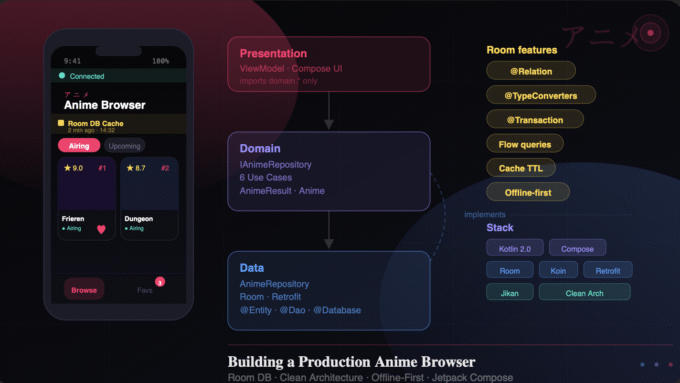
The app follows Clean Architecture with three strict layers:
Presentation → Domain ← Data
The arrows tell the whole story. Presentation talks to Domain. Data implements Domain. Presentation never touches Data directly. That’s enforced in code — the ViewModel imports zero classes from data.*.
The Layers in Practice
Data layer owns:
AnimeEntity+FavoriteEntity— Room tablesAnimeDao— all SQL queriesAppDatabase— the Room entry pointAnimeRepository— implementsIAnimeRepository- Retrofit API interface and DTOs
Domain layer owns:
IAnimeRepository— the contract (interface)AnimeResult,Anime,AnimeFavorite— pure Kotlin models- Six use cases — one responsibility each
Presentation layer owns:
AnimeViewModel— only imports domain- Compose screens and components
- Theme and styling
Room DB — What This App Actually Teaches
Two Tables with @Relation
Most tutorials have one table. This app has two — and joins them with @Relation:
@Entity(tableName = "anime_cache",
    indices = [Index(value = ["malId", "category"], unique = true)])
data class AnimeEntity(
    @PrimaryKey(autoGenerate = true) val id: Int = 0,
    val malId: Int,
    val title: String,
    // ...
    val genres: String,    // stored as JSON via TypeConverter
    val studios: String,
    val category: String,
    val cachedAt: Long = System.currentTimeMillis()
)

@Entity(tableName = "anime_favorites")
data class FavoriteEntity(
    @PrimaryKey val malId: Int,
    val title: String,
    val imageUrl: String,
    val score: Double?,
    val addedAt: Long = System.currentTimeMillis()
)
The join POJO — this is the @Relation magic:
data class AnimeWithFavorite(
    @Embedded val anime: AnimeEntity,
    @Relation(
        parentColumn = "malId",
        entityColumn = "malId"
    )
    val favorite: FavoriteEntity?  // null = not favorited
)
When you query AnimeWithFavorite, Room executes two queries atomically (protected by @Transaction) and assembles the result for you. No JOIN syntax. No cursor manipulation.
TypeConverters for List<String>
Room can’t store List<String> natively. Enter @TypeConverters:
class AnimeConverters {
    private val gson = Gson()

    @TypeConverter
    fun fromStringList(list: List<String>): String = gson.toJson(list)

    @TypeConverter
    fun toStringList(json: String): List<String> {
        val type = object : TypeToken<List<String>>() {}.type
        return gson.fromJson(json, type)
    }
}
Register it once at the database level — Room applies it globally:
@Database(entities = [AnimeEntity::class, FavoriteEntity::class], version = 1)
@TypeConverters(AnimeConverters::class)
abstract class AppDatabase : RoomDatabase() {
    abstract fun animeDao(): AnimeDao
}
The DAO — Flow for Live Data
@Dao
interface AnimeDao {
    @Insert(onConflict = OnConflictStrategy.REPLACE)
    suspend fun insertAll(anime: List<AnimeEntity>)

    // Flow = auto-updates UI when DB changes
    @Query("SELECT * FROM anime_cache WHERE category = :category ORDER BY rank ASC")
    fun observeByCategory(category: String): Flow<List<AnimeEntity>>

    @Query("SELECT COUNT(*) FROM anime_favorites WHERE malId = :malId")
    fun isFavorite(malId: Int): Flow<Int>

    @Transaction
    @Query("SELECT * FROM anime_cache WHERE category = :category")
    fun observeWithFavorites(category: String): Flow<List<AnimeWithFavorite>>

    @Query("DELETE FROM anime_cache WHERE cachedAt < :before")
    suspend fun deleteOlderThan(before: Long)
}
The key insight: functions returning Flow should not be suspend. Room manages the coroutine internally. Only one-shot reads like getById() are suspend.
The Offline-First Repository
This is where the real architecture lives. The strategy:
- Emit cached data immediately — UI shows something in milliseconds
- Check cache age — if fresh (< 30 min), stop there
- If stale and online — fetch from Jikan, replace cache, emit fresh data
- If offline — show stale data with a clear error message
class AnimeRepository(
    private val api: AnimeApi,
    private val dao: AnimeDao,
    private val connectivity: ConnectivityObserver
) : IAnimeRepository {

    override fun getAnimeByCategory(
        category: AnimeCategory,
        forceRefresh: Boolean
    ): Flow<AnimeResult> = flow {

        emit(AnimeResult.Loading)

        // Step 1: Emit cache immediately
        val cached = dao.observeByCategory(category.name).first()
        val cacheTimestamp = cached.firstOrNull()?.cachedAt ?: 0L
        if (cached.isNotEmpty()) {
            emit(AnimeResult.Success(cached.map { it.toDomain() },
                fromCache = true, cachedAt = cacheTimestamp))
        }

        // Step 2: Freshness check
        val age = System.currentTimeMillis() - cacheTimestamp
        if (age < CACHE_TTL_MS && !forceRefresh && cached.isNotEmpty()) return@flow

        // Step 3: Network fetch
        if (!connectivity.isOnline()) {
            emit(AnimeResult.Error("Offline — showing ${cached.size} cached anime", cached.map { it.toDomain() }))
            return@flow
        }

        try {
            val response = api.getTopAnime(filter = category.endpoint, limit = 20)
            val entities = response.data.map { it.toEntity(category) }
            dao.deleteByCategory(category.name)
            dao.insertAll(entities)
            emit(AnimeResult.Success(entities.map { it.toDomain() },
                fromCache = false, cachedAt = System.currentTimeMillis()))
        } catch (e: Exception) {
            emit(AnimeResult.Error("Network error — showing cached data", cached.map { it.toDomain() }))
        }
    }
}
Notice AnimeResult lives in the domain layer — not in data. The repository returns a domain type. Presentation never needs to know what’s behind it.
The Repository Interface — The Abstraction Boundary
// domain/repository/IAnimeRepository.kt
interface IAnimeRepository {
    fun getAnimeByCategory(category: AnimeCategory, forceRefresh: Boolean = false): Flow<AnimeResult>
    fun observeFavorites(): Flow<List<AnimeFavorite>>
    fun isFavorite(malId: Int): Flow<Int>
    fun favoriteCount(): Flow<Int>
    suspend fun toggleFavorite(anime: Anime)
    suspend fun totalCachedCount(): Int
    suspend fun cachedCategoryCount(): Int
}
AnimeRepository implements this. But the ViewModel never sees AnimeRepository. It only sees the interface — injected via Koin:
// di/AppModule.kt
single<IAnimeRepository> { AnimeRepository(get(), get(), get()) }
Swap the implementation for a mock, a different API, or a test double — zero changes to ViewModel or UI.
Use Cases — One Responsibility Each
Six use cases, each wrapping exactly one repository operation:
class GetAnimeByCategoryUseCase(private val repository: IAnimeRepository) {
    operator fun invoke(category: AnimeCategory, forceRefresh: Boolean = false): Flow<AnimeResult> =
        repository.getAnimeByCategory(category, forceRefresh)
}

class ToggleFavoriteUseCase(private val repository: IAnimeRepository) {
    suspend operator fun invoke(anime: Anime) = repository.toggleFavorite(anime)
}

class CheckIsFavoriteUseCase(private val repository: IAnimeRepository) {
    operator fun invoke(malId: Int): Flow<Boolean> =
        repository.isFavorite(malId).map { it > 0 }
}

data class DbStats(val totalCached: Int, val cachedCategories: Int)

class GetDbStatsUseCase(private val repository: IAnimeRepository) {
    suspend operator fun invoke() = DbStats(
        totalCached = repository.totalCachedCount(),
        cachedCategories = repository.cachedCategoryCount()
    )
}
operator fun invoke() lets callers write getAnimeByCategory(tab) instead of getAnimeByCategory.execute(tab). It reads like a function call, which is exactly what it is.
The ViewModel — Clean Separation Enforced
class AnimeViewModel(
    // ✅ Only use cases — zero data.* imports
    private val getAnimeByCategory: GetAnimeByCategoryUseCase,
    private val toggleFavorite: ToggleFavoriteUseCase,
    private val observeFavoritesUseCase: ObserveFavoritesUseCase,
    private val checkIsFavorite: CheckIsFavoriteUseCase,
    private val getFavoriteCount: GetFavoriteCountUseCase,
    private val getDbStats: GetDbStatsUseCase,
    private val connectivity: ConnectivityObserver
) : ViewModel() {

    val favorites: StateFlow<List<AnimeFavorite>> = observeFavoritesUseCase()
        .stateIn(viewModelScope, SharingStarted.WhileSubscribed(5000), emptyList())

    private fun loadCurrentTab(forceRefresh: Boolean = false) {
        viewModelScope.launch {
            getAnimeByCategory(_selectedTab.value, forceRefresh).collect { result ->
                when (result) {
                    is AnimeResult.Loading -> { /* update loading state */ }
                    is AnimeResult.Success -> { /* update UI with data */ }
                    is AnimeResult.Error   -> { /* show error, keep stale data */ }
                }
            }
        }
    }
}
The ViewModel import block has zero occurrences of data. — that’s the enforcement mechanism.
Koin DI — Wiring It All Together
val appModule = module {
    // Room
    single {
        Room.databaseBuilder<AppDatabase>(context = androidContext(), name = "anime_db")
            .fallbackToDestructiveMigration(dropAllTables = true)
            .build()
    }
    single { get<AppDatabase>().animeDao() }

    // Retrofit
    single { /* OkHttpClient */ }
    single { /* Retrofit -> AnimeApi */ }

    // Utils
    single { ConnectivityObserver(androidContext()) }

    // Repository bound to INTERFACE — the key line
    single<IAnimeRepository> { AnimeRepository(get(), get(), get()) }

    // Use cases — factory (new instance per injection, stateless)
    factory { GetAnimeByCategoryUseCase(get()) }
    factory { ToggleFavoriteUseCase(get()) }
    factory { ObserveFavoritesUseCase(get()) }
    factory { CheckIsFavoriteUseCase(get()) }
    factory { GetFavoriteCountUseCase(get()) }
    factory { GetDbStatsUseCase(get()) }

    // ViewModel receives use cases, not repository
    viewModel { AnimeViewModel(get(), get(), get(), get(), get(), get(), get()) }
}
Use cases are factory {} not single {} — they’re stateless, so creating a new instance per injection is cheap and avoids shared mutable state.
The UI — Cache Status as a First-Class Citizen
Most apps hide caching from users. This app makes it explicit — because it’s educational, but also because transparency builds trust.
@Composable
private fun CacheStatusBar(fromCache: Boolean, cachedAt: Long, ...) {
    val accentColor = if (fromCache) GoldScore else AquaMint

    Row(
        modifier = Modifier
            .background(accentColor.copy(0.07f))
            .padding(16.dp)
    ) {
        Icon(
            imageVector = if (fromCache) Icons.Outlined.Storage else Icons.Outlined.CloudDone,
            tint = accentColor
        )
        Column {
            Text(if (fromCache) "Room DB Cache" else "Jikan API → Room", color = accentColor)
            Text(TimeUtils.fullDateTime(cachedAt), color = White25)
        }
        // DB stats pills: 20 anime · 60 cached · 3 fav
    }
}
Gold = cache. Mint = live network. The user always knows exactly what they’re looking at and when it was fetched.
The Favorites Screen — @Relation in Action
The favorites screen demonstrates why the two-table design matters. When you add a favorite, the anime_favorites table is written independently of anime_cache. That means:
- Favorites survive cache expiry
- Favorites persist after you
deleteOlderThan()clears stale anime - The
@Relationjoin inAnimeWithFavoritestill works across refreshes
// Favorites survive cache clears because they're a separate table
@Query("DELETE FROM anime_cache WHERE cachedAt < :before")
suspend fun deleteOlderThan(before: Long)  // ← doesn't touch anime_favorites

@Query("SELECT * FROM anime_favorites ORDER BY addedAt DESC")
fun observeFavorites(): Flow<List<FavoriteEntity>>  // ← always intact
The confirm-to-remove interaction in the favorites grid uses a local showConfirm state — no dialog needed, just a composable overlay:
var showConfirm by remember { mutableStateOf(false) }

AnimatedVisibility(visible = showConfirm) {
    Box(Modifier.fillMaxSize().background(Color(0xEE0E0E14))) {
        // Cancel / Remove buttons
    }
}
Key Takeaways
Room lessons from this project:
- Use
Flowfor live-updating queries — notsuspend+ one-shot reads @TypeConverterssolves complex field types — register at@Databaselevel@Relation+@Transactionfor joined queries across tables@Indexon frequently queried columns (malId,category) for performancecachedAt: Longon every cached entity — you need it for TTL logic
Architecture lessons:
- The interface (
IAnimeRepository) is the boundary — define it in domain, implement in data - Use cases enforce the single-responsibility principle and keep ViewModels lean
AnimeResultbelongs in domain — not in the layer that produces itfactory {}for use cases in Koin,single {}for the repository
UI lessons:
- Show the user where their data came from — cache vs network transparency builds confidence
StateFlow+collectAsState()is the idiomatic Compose pattern for ViewModel → UISharingStarted.WhileSubscribed(5000)stops the flow 5 seconds after the last subscriber — proper lifecycle management
Source Code
https://github.com/rishira-n/CacheKage
The complete project is available with 27 Kotlin files covering the full stack — from Room entity to Compose UI. Every architectural decision in this article is reflected in the code.
Built with: Kotlin · Jetpack Compose · Room 2.7.1 · Retrofit 2.11 · Koin 3.5 · Jikan API v4
📚 References
Room Persistence Library
https://developer.android.com/training/data-storage/room
https://rushira.in/https-rushira-in-room/