

WorkManager in Android

WorkManager is part of Android Jetpack, designed to handle background tasks that need to run reliably—even if your app is closed, killed, or the device restarts.
| Library | androidx.work |
|---|---|
| Part of | Android Jetpack |
| API min | API 14+ |
| Storage | Internal SQLite database |
| Reboot safe | Yes |
| Threading | Coroutines RxJava ListenableFuture |
🧠 In Simple Terms
WorkManager = “Do this task, no matter what happens to the app.”
It ensures:
- ✅ Task will execute eventually
- ✅ Survives app restarts
- ✅ Survives device reboots
- ✅ Respects battery optimizations (Doze mode)
- ✅ Stored in an internal SQLite database
⚙️ When to Use WorkManager
Use it when:
- Work must be guaranteed to run
- It’s okay if the task is not immediate
- You need constraints (WiFi, charging, battery, etc.)
Don’t use it for:
- ❌ Exact-time alarms → use
AlarmManager - ❌ Music playback or ongoing tasks → use
ForegroundService - ❌ Work that’s fine to cancel if the app dies → use
Coroutines - ❌ Real-time or millisecond-precision tasks
Types of work
WorkManager handles three types of work:
- Immediate: Tasks that must begin immediately and complete soon. May be expedited.
- Long Running: Tasks which might run for longer, potentially longer than 10 minutes.
- Deferrable: Scheduled tasks that start at a later time and can run periodically.
Figure 1 outlines how the different types of tasks relate to one another.
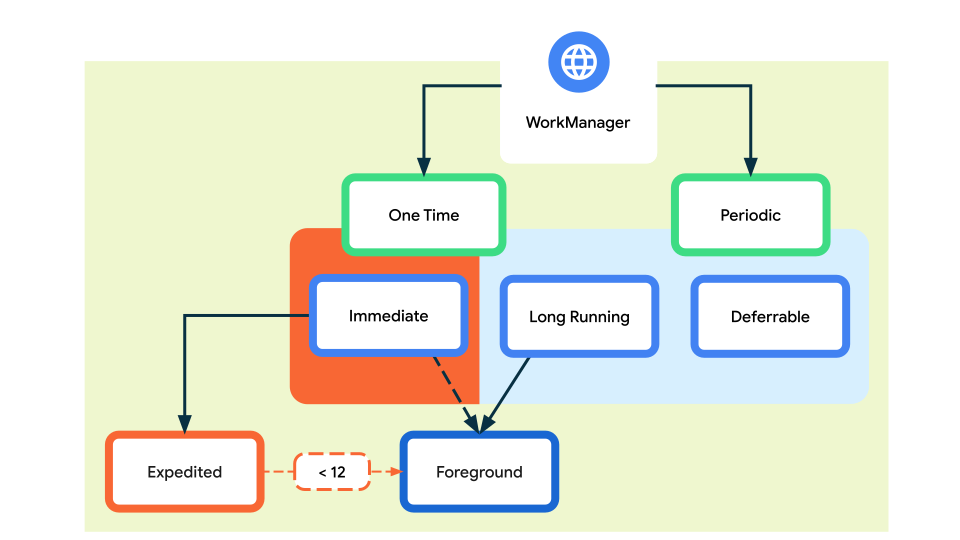
Figure 1: Types of work.
Similarly, the following table outlines the various types of work.
| Type | Periodicity | How to access |
|---|---|---|
| Immediate | One time | OneTimeWorkRequest and Worker. For expedited work, call setExpedited() on your OneTimeWorkRequest. |
| Long Running | One time or periodic | Any WorkRequest or Worker. Call setForeground() in the Worker to handle the notification. |
| Deferrable | One time or periodic | PeriodicWorkRequest and Worker. |
For more information regarding how to set up WorkManager, see the Defining your WorkRequests guide.
✨ Key Features
1. Work Constraints
Constraints tell WorkManager to only run the job when certain conditions are met.
val constraints = Constraints.Builder()
    .setRequiredNetworkType(NetworkType.UNMETERED)
    .setRequiresBatteryNotLow(true)
    .setRequiresCharging(false)
    .setRequiresStorageNotLow(true)
    .build()
Available:
NetworkType, battery level, charging state, storage level, device idle.
2. Robust Scheduling
- Schedule work to run once or repeatedly
- Work can be tagged and named for grouping and cancellation
- Stored in SQLite — persists across reboots
- Automatically adheres to Doze mode
val request = OneTimeWorkRequestBuilder<MyWorker>()
    .setInputData(workDataOf("KEY" to "value"))
    .setConstraints(constraints)
    .addTag("my_tag")
    .build()

WorkManager.getInstance(context).enqueue(request)
3. Expedited Work
For tasks important to the user that complete within a few minutes.
val request = OneTimeWorkRequestBuilder<MyWorker>()
    .setExpedited(OutOfQuotaPolicy.RUN_AS_NON_EXPEDITED_WORK_REQUEST)
    .build()
4. Flexible Retry Policy
Return Result.retry() and WorkManager reschedules using your backoff policy.
.setBackoffCriteria(
    BackoffPolicy.EXPONENTIAL,
    10_000L,
    TimeUnit.MILLISECONDS
)
Delay sequence: 10s → 20s → 40s → 80s … up to a max of 5 hours.
5. Work Chaining
Chain workers sequentially or in parallel. Output from one worker is automatically passed as input to the next.
kotlin
WorkManager.getInstance(context)
    .beginUniqueWork(
        "image_work",
        ExistingWorkPolicy.REPLACE,
        OneTimeWorkRequest.from(CleanupWorker::class.java)
    )
    .then(OneTimeWorkRequest.from(FilterWorker::class.java))
    .then(OneTimeWorkRequest.from(BlurWorker::class.java))
    .then(uploadRequest)
    .enqueue()
6. Built-in Threading
Integrates with Coroutines, RxJava, and ListenableFuture.
class MyWorker(
    ctx: Context,
    params: WorkerParameters
) : CoroutineWorker(ctx, params) {

    override suspend fun doWork(): Result {
        // Read input
        val value = inputData.getString("KEY")

        // Report progress
        setProgress(workDataOf("progress" to 50))

        // Do work...

        // Return result with output
        return Result.success(
            workDataOf("OUTPUT" to "result")
        )
    }
}
🔄 Worker State Lifecycle
BLOCKED → ENQUEUED → RUNNING → SUCCEEDED
                   ↘ FAILED
                   ↘ CANCELLED
| State | Meaning |
|---|---|
BLOCKED | Waiting on a chained prerequisite |
ENQUEUED | Queued, waiting for constraints to be met |
RUNNING | doWork() is actively executing |
SUCCEEDED | Result.success() was returned |
FAILED | Result.failure() was returned |
CANCELLED | Cancelled via cancelWorkById() |
👁️ Observing Work
Observe WorkInfo in your ViewModel using Flow (recommended for Compose):
viewModelScope.launch {
    WorkManager.getInstance(context)
        .getWorkInfoByIdFlow(request.id)
        .collect { workInfo ->
            when (workInfo?.state) {
                WorkInfo.State.RUNNING -> {
                    val progress = workInfo.progress.getInt("progress", 0)
                    // update UI
                }
                WorkInfo.State.SUCCEEDED -> {
                    val output = workInfo.outputData.getString("OUTPUT")
                    // handle result
                }
                WorkInfo.State.FAILED -> { /* handle */ }
                else -> {}
            }
        }
}
❌ Cancelling Work
val wm = WorkManager.getInstance(context)

// Cancel by specific UUID
wm.cancelWorkById(request.id)

// Cancel all jobs with a tag
wm.cancelAllWorkByTag("my_tag")

// Cancel unique work by name
wm.cancelUniqueWork("image_work")

// Cancel ALL work (use sparingly)
wm.cancelAllWork()
🔁 Unique Work Policies
Prevent duplicate jobs using enqueueUniqueWork():
| Policy | Behaviour |
|---|---|
REPLACE | Cancels the existing job, starts the new one |
KEEP | Ignores the new request if a job already exists |
APPEND | Chains the new request after the existing one |
WorkManager.getInstance(context)
    .enqueueUniqueWork(
        "sync_job",
        ExistingWorkPolicy.REPLACE,
        request
    )
🆚 WorkManager vs Other APIs
| API | Best for | Relationship |
|---|---|---|
| WorkManager | Guaranteed, deferrable work | Persists across reboots ✅ |
| Coroutines | In-process async work | Cancelled when app closes ❌ |
| AlarmManager | Exact-time alarms only | Wakes device — power heavy ⚠️ |
| ForegroundService | Ongoing work with notification | Needs persistent notification |
📦 Quick Setup
Gradle dependency:
// app/build.gradle
implementation "androidx.work:work-runtime-ktx:2.9.0"
Three things you always use:
Worker— where your task code lives (doWork())WorkRequest— describes what to run and whenWorkManager— enqueue and observe
⚠️ Remember: WorkManager does not guarantee exact-time execution. It guarantees eventual execution when constraints allow. For precise alarms, use
AlarmManager.
Next steps
Check out this app